

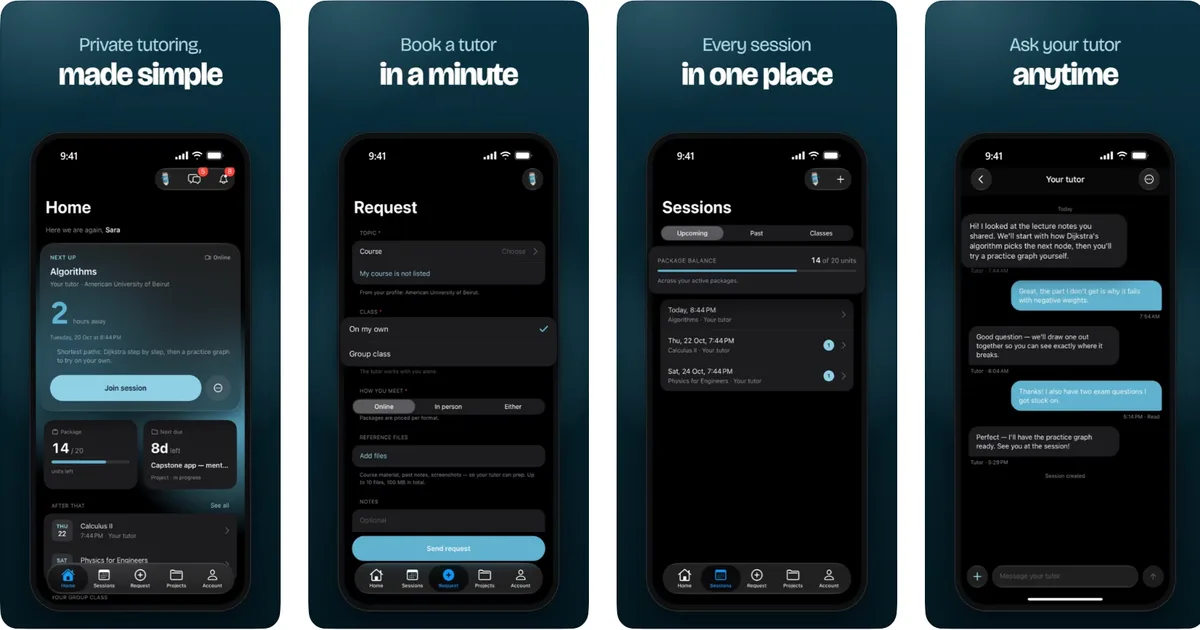
The way university students access academic support is changing. Instead of spending hours searching for tutors, coordinating sessions through different platforms, or struggling to organize their courses, students can now manage their tutoring experience from their phones.
Introducing the Java Assistant Mobile App, a platform designed to make private tutoring, group classes, project guidance, and academic support more accessible.
Whether you're studying at the American University of Beirut (AUB), Lebanese American University (LAU), Beirut Arab University (BAU), or a university in Kuwait, Saudi Arabia, the UAE, or another country, Java Assistant helps connect you with qualified tutors.
Your university support, directly from your phone.
In this guide, we'll explain how the Java Assistant mobile application works, how to book tutoring sessions, how to communicate with tutors, and how to manage your academic activities.
1. What Is the Java Assistant Mobile App?
The Java Assistant Mobile App is an educational platform connecting university and school students with verified tutors.
The application helps students request academic assistance, organize tutoring sessions, communicate with tutors, and follow their learning progress.
Rather than switching between multiple communication channels, students can access important information through one mobile application.
What Can Students Do With Java Assistant?
- Request private tutoring for their university courses.
- Book one-on-one sessions online or in person, depending on availability.
- Participate in group classes with other students.
- Request project guidance and academic feedback.
- Communicate with their assigned tutors through the application.
- Track booked sessions and tutoring hours from their accounts.
- Receive notifications about their academic activities.
- Check upcoming sessions through the student dashboard.
- Pay for private tutoring sessions using Whish, directly through the app.
- Rate completed tutoring sessions and share feedback.
The goal is simple: Make academic support easier to access, organize, and manage.
2. Step One: Download the Java Assistant Mobile App
Getting started with Java Assistant is simple.
Download Java Assistant for iPhone
The application is available on the Apple App Store.
Official iOS Download:
Download Java Assistant on the App Store
How to Install the Application
- Open the App Store on your iPhone.
- Search for Java Assistant.
- Select the official Java Assistant application.
- Tap Get to download it.
- Open the application after installation.
- Create your account or log in if you're already registered.
The Java Assistant application is free to download.
The iPhone application requires iOS 16.4 or later.
Is Java Assistant Available for Android?
The Android application is currently listed as Coming Soon.
Android users can still access Java Assistant through the official website:
3. Step Two: Create Your Java Assistant Account
After downloading the application, the next step is creating your student account.
Java Assistant allows users to register according to their role.
Available Account Types
Student Account
For university and school students who need tutoring, exam preparation, group classes, or project guidance.
Tutor Account
For qualified educators who want to apply, complete the verification process, and provide tutoring services.
Broker Account
For eligible educational agencies and brokers coordinating academic support for their students.
How to Register as a Student
- Open the Java Assistant application.
- Select the student registration option.
- Enter the information requested by the platform.
- Complete your student profile.
- Log in to access your dashboard.
You can also create your account through the website:
Create Your Java Assistant Account
Registration is free, and students do not need to purchase tutoring hours to create an account.
4. Step Three: Request a Private Tutoring Session
One of the main features of the Java Assistant mobile app is the ability to request private tutoring for specific subjects and courses.
Instead of searching for a tutor independently, students can submit their academic needs through the platform.
How to Request Tutoring
Step 1: Log in to your Java Assistant account.
Step 2: Navigate to the tutoring or session request option.
Step 3: Provide the course or subject for which you need assistance.
Step 4: Enter the relevant academic details, including your level and preferred language.
Step 5: Submit your tutoring request.
Step 6: The Java Assistant team works to match you with a verified tutor who meets your academic requirements.
What Subjects Are Supported?
Java Assistant supports students across different academic disciplines, including:
- Engineering: Electrical, mechanical, civil, computer, and communication engineering.
- Computer Science: Programming, algorithms, databases, and software-related courses.
- Mathematics: Calculus, algebra, statistics, and other mathematics subjects.
- Business: Accounting, finance, economics, and management.
- Science: Physics, chemistry, biology, and related subjects.
- Other Majors: Academic assistance based on tutor expertise and availability.
Whether you're preparing for a difficult exam or trying to understand a challenging course, Java Assistant helps you find suitable academic support.
5. Step Four: Get Matched With a Verified Tutor
After submitting a request, Java Assistant works to identify a tutor who fits your needs.
Tutor matching considers factors such as:
- Course and subject expertise.
- Academic level.
- University or educational requirements.
- Preferred language.
- Tutor availability.
How Does Java Assistant Verify Tutors?
Java Assistant uses a tutor review process that includes checking academic qualifications, identity information, and professional background.
Applicants may also complete an interview or introductory video assessment before approval.
This approach is designed to help students receive support from tutors with relevant qualifications.
Java Assistant focuses on verified academic support rather than leaving students to search through an unrestricted tutor directory.
6. Step Five: Book and Manage Your Tutoring Sessions
Once your tutoring request is arranged, you can manage your learning activities through the application.
Session Management Features
The Java Assistant application allows students to:
- View upcoming tutoring sessions.
- Check confirmed session details.
- Track tutoring hours.
- Monitor their available package balance.
- View their next scheduled session.
- Receive relevant session notifications.
Live Session Countdown
The application includes a live countdown to your upcoming tutoring session.
This feature helps students identify when their next session is approaching.
For university students balancing lectures, exams, and assignments, having upcoming sessions visible in one place makes academic planning easier.
7. Step Six: Communicate Directly With Your Tutor
Communication is an important part of effective tutoring.
The Java Assistant mobile application includes messaging features that help students remain connected with their assigned tutors.
What Can You Discuss With Your Tutor?
- Topics covered during tutoring sessions.
- Questions about your course material.
- Upcoming exam preparation.
- Study priorities.
- Feedback and academic progress.
- Preparation for future sessions.
Students can communicate before and after sessions to clarify relevant academic questions.
Better communication helps students prepare more effectively and make better use of their tutoring time.
8. Join Group Classes Through Java Assistant
Not every student prefers individual tutoring.
Some students enjoy learning with classmates, discussing questions together, and studying in a collaborative environment.
That's why Java Assistant also supports group tutoring classes.
How Do Group Classes Work?
- Register or log in to your Java Assistant account.
- Arrange participation in an available group class.
- View your scheduled class in the application.
- Receive a notification when your class is scheduled.
- Access the class information through your dashboard.
- Copy the available joining code when needed.
The application displays relevant group-class information through the Home and Sessions sections.
Benefits of Group Classes
- Collaborative learning with other students.
- Shared explanations of difficult academic concepts.
- Structured revision before exams.
- Opportunities to learn from classmates' questions.
- Flexible group study arrangements based on available classes.
Group classes can be useful for students who share the same course or want to prepare for an upcoming examination together.
9. Request University Project Guidance
University assignments and projects often require more than memorizing lecture material.
Students may need assistance understanding technical concepts, planning project stages, reviewing drafts, or identifying mistakes.
Java Assistant provides project guidance to support students throughout their learning process.
Examples of Project Support
- Engineering project guidance.
- Programming and software development explanations.
- Research and report guidance.
- Presentations and academic reviews.
- Technical problem-solving sessions.
- Feedback on project drafts and approaches.
How to Request Project Support
- Open Java Assistant or visit the official website.
- Select the available project support option.
- Provide information about your course and project.
- Explain the specific guidance you need.
- Share relevant materials when requested.
- Receive information about the proposed support and pricing.
Project requests are reviewed individually, and students can receive a quote before proceeding.
The purpose of project guidance is to help students understand their work, solve problems, and develop their own academic skills.
Students should always follow their university's academic integrity policies.
10. Pay for Tutoring Sessions With Whish
Managing tutoring payments is another important part of the student experience.
Java Assistant supports several payment methods, including Whish, making it easier for students in Lebanon to pay for academic services.
How Does Whish Payment Work in the App?
- Log in to your Java Assistant student account.
- Arrange your private tutoring session or package.
- Choose the available Whish payment option.
- Follow the payment instructions displayed in the application.
- Complete the payment.
- Check your account for the updated payment or package information.
Whish payments for private tutoring are supported directly through the iPhone application.
Additional payment methods may be available through Java Assistant, including:
- Whish.
- OMT.
- Western Union.
- Bank transfer.
Payment availability and processing requirements may depend on the selected method.
For more details, visit:
Java Assistant Official Website
11. Track Your Tutoring Hours and Learning Activities
Students often purchase tutoring hours across multiple sessions.
Keeping track of those hours manually can become confusing.
The Java Assistant application helps students monitor important tutoring information from their accounts.
What Can You Track?
- Upcoming sessions.
- Completed and scheduled tutoring activities.
- Logged tutoring hours.
- Remaining package balance.
- Relevant group-class details.
- Session information and notifications.
Everything is organized to help students understand their tutoring schedule and available hours.
This can be particularly useful during exam periods when students may have multiple tutoring sessions in the same week.
12. Rate Your Sessions and Share Feedback
Student feedback helps maintain the quality of educational services.
After completing a tutoring session, students can provide a rating and share feedback about their experience.
Why Is Student Feedback Important?
Feedback helps Java Assistant:
- Monitor tutoring quality.
- Identify areas for improvement.
- Understand student satisfaction.
- Review tutoring experiences.
- Improve the overall student support process.
Your experience matters, and your feedback can help improve the platform for other students.
13. How Does the Java Assistant App Work for Tutors?
The Java Assistant application is not designed exclusively for students.
It also supports tutors who provide educational services through the platform.
Tutor Features
Approved tutors can use the application to:
- Receive tutoring opportunities related to their subjects.
- Manage assigned sessions.
- Log completed tutoring hours.
- Communicate with students.
- Share feedback and session notes.
- Monitor their earnings and payouts.
- Track relevant group-class hours.
How to Become a Java Assistant Tutor
- Visit Java Assistant or open the application.
- Select the tutor application option.
- Complete the requested information.
- Submit relevant academic and verification documents.
- Complete the required review process.
- After approval, receive suitable tutoring opportunities.
Tutor applications are subject to verification and approval.
Apply to Become a Java Assistant Tutor
14. Who Can Use the Java Assistant Mobile App?
Java Assistant serves school and university students in Lebanon and internationally.
Universities in Lebanon
Students from universities such as:
- American University of Beirut (AUB).
- Lebanese American University (LAU).
- Beirut Arab University (BAU).
- Université Saint-Joseph (USJ).
- Holy Spirit University of Kaslik (USEK).
- Notre Dame University (NDU).
- Lebanese International University (LIU).
Can request academic support based on their courses and tutor availability.
International Student Support
Java Assistant also supports students in international markets, including:
- Kuwait.
- Saudi Arabia.
- United Arab Emirates.
- Qatar.
- Bahrain.
- Other countries in Europe and beyond.
Students can use the online tutoring service to access educational support without needing to attend a physical tutoring center.
15. Why Use the Java Assistant Mobile App Instead of Traditional Tutoring Arrangements?
Traditional tutoring arrangements can involve numerous messages, manual scheduling, and separate payment coordination.
Java Assistant aims to simplify these processes through a unified platform.
Main Advantages
1. Convenience
Request tutoring and manage sessions directly from your phone.
2. Verified Tutors
Access tutors who have completed the platform's review and verification process.
3. Session Organization
Keep important tutoring details together in one account.
4. Communication
Stay connected with your tutor through in-app messaging.
5. Payment Options
Access supported payment methods, including Whish for private tutoring sessions.
6. Group Learning
Participate in scheduled group classes when available.
7. Academic Flexibility
Request guidance for different majors, courses, exams, and projects.
Java Assistant combines academic support with technology designed around student needs.
Frequently Asked Questions About the Java Assistant Mobile App
Is the Java Assistant mobile app free?
Yes. The Java Assistant application is free to download, and creating an account is free. Tutoring sessions and other paid services have separate pricing.
Where can I download the Java Assistant app?
You can download it from the Apple App Store:
Java Assistant — Official iPhone App
Is Java Assistant available on Android?
The official website currently lists the Android application as Coming Soon. Android users can access the platform through javaassistant.com.
Can I book a private tutor using Java Assistant?
Yes. Students can request private tutoring and receive assistance with finding a suitable verified tutor for their course.
Does Java Assistant offer group classes?
Yes. Java Assistant supports scheduled group classes, and students can view their relevant class details through the application.
Can I communicate with my tutor through the app?
Yes. The mobile application includes messaging features for communication between students and their assigned tutors.
Can I pay with Whish on Java Assistant?
Yes. The iPhone application supports Whish payments for private tutoring sessions.
Can I check how many tutoring hours I have left?
Yes. The application provides package balance information to help students monitor their available tutoring hours.
Does Java Assistant support AUB, LAU, and BAU students?
Yes. Students from these universities can request academic tutoring and guidance according to their courses and tutor availability.
Can tutors use the Java Assistant application?
Yes. Tutors can apply, manage sessions, log hours, communicate with students, and track earnings through the platform.
Is Java Assistant available outside Lebanon?
Yes. Java Assistant supports online tutoring for students in multiple countries, including Gulf markets and other international locations.
Download Java Assistant and Start Learning
Ready to make your academic journey easier?
With the Java Assistant Mobile App, you can request tutoring, organize your sessions, communicate with verified tutors, join group classes, and track your academic support activities directly from your iPhone.
Your courses. Your tutors. Your sessions. One application.
Java Assistant Official Links
Download for iPhone: Java Assistant on the Apple App Store
Official Website: www.javaassistant.com
Instagram: Follow @java_assistant
WhatsApp Support: Contact Java Assistant
How It Works: Explore the Java Assistant Tutoring Process
JAVA ASSISTANT — YOUR UNIVERSITY SUPPORT, NOW IN YOUR POCKET
Download. Register. Request. Learn.
Connecting students with verified tutors across Lebanon, the Gulf, and beyond.